
Yoonla is a website that promises to help us build the ultimate digital lifestyle.
At this stage, I am not entirely sure exactly what that means, but it’s definitely something that I want to know more about.

So let’s take a closer look at the recently revamped program and find out what we can expect from the ‘ultimate digital lifestyle’ that is being promised to us in my Yoonla review.

What Exactly Is Yoonla?
Launched in September 2016, Yoonla was created by Reno Van Boven – an online entrepreneur with over 12 years of experience.

From the Yoonla website itself, it’s difficult to determine exactly what the ultimate digital lifestyle is.
It obviously points to earning an income online in some way, but that right there is my first area of concern with the Yoonla website…it doesn’t explain the ‘how’.
That’s not such a major problem because it is free to set up a Starter Account with Yoonla, so to learn anything about what the program has to offer, you need to hand over your contact details.
Inside The (Free) Yoonla Starter Membership
First things first, I have to say the process of setting up a Starter account at Yoonla is straightforward and doesn’t alert me to any scam techniques being deployed.
With my details all confirmed in a matter of minutes, I’m given full access to the Yoonla members’ area.

There’s nothing to be concerned about here. In fact, it’s all rather clean and well-formatted.
There are, however, very obvious attempts being made to encourage me to take the ‘Free Priority Setup & Elite Upgrade’ offer that is valued at $297.
I’m not interested in that just yet, but I will be checking it out later.
My focus right now is on the intro video and 7 steps that are so neatly laid out on the left-hand side of the menu.
Let me give you a brief overview of those steps before putting everything in a nutshell and explaining the Yoonla process.
Don’t worry if anything in the steps below confuses you. I will simplify everything shortly.
#Intro Video
A very nice introduction from Reno, who explains a little bit more about Yoonla.
He explains how over 1.2 million people joined the program in its first phase, and how transparency and honesty are the name of the game at Yoonla.
This all sounds great, but I’m still unsure about what I will be doing.
#Step 1: Evolve App & Commission Tracking
Still no explanation about the Yoonla process, but in this step, I am instructed to download a zip file. Reno calls it the ‘Evolve App’, but I can tell these are the necessary files to create a website squeeze page.
#Step 2: Create Automation Account
Once again, Reno chooses his own terminology to explain this part of the process. An “automation account to automate the digital revenue streams” is actually an autoresponder called ‘GetResponse’ and to use this you need to pay a monthly fee.
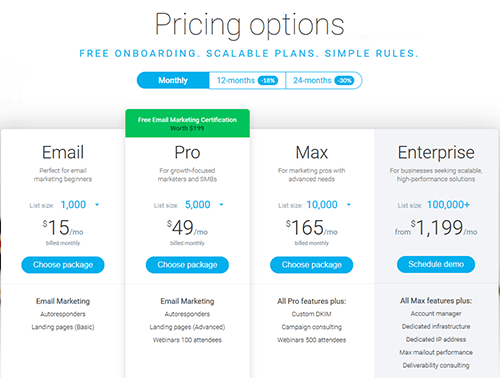
Reno says you can pick any option, but says the $15 per month option is fine to get started.
That’s great, but at this stage, you’ve agreed to pay $15 per month and you still don’t know what you will be doing.
#Step 3: Setup Automation Account
This step is all about setting up your GetResponse account. The emphasis is on ensuring it is done correctly, and that you set up a copy & paste welcome email.
#Step 4: Create Small Business Account
Another specific use of words from Reno, and this time he is actually referring to setting up a website hosting account with Yahoo.
He advises that you opt for the advanced account at $3.99 per month. It would appear that Yahoo has since increased their prices as that particular account is now $5.89 per month.
Reno also explains how to set up a domain name to use in conjunction with your squeeze page and hosting.
 I noticed here that despite the cost being displayed as a monthly charge when you get through to the payment screen it automatically defaults to paying for a full year upfront at $82.46.
In the step 4 video, Reno doesn’t mention that it can be changed from yearly to monthly, but you can do so by clicking on the link highlighted below.

So this brings your current costs to $15 per month for your autoresponder at GetResponse, and $82.46 for your yearly website hosting at Yahoo.
#Step 5 Get Your Evolve App Online
This is the most complicated step of the process. It involves using an FTP program to upload your squeeze page to your website hosting at Yahoo. Reno goes over the steps in great detail.
#Step 6: Customize Your Evolve Site
With your ‘Evolve App’ uploaded to your hosting, step 6 explains how to make minor changes to the wording on your squeeze page.
#Step 7: Activate Your Evolve Funnel
Step 7 is the final step of the process, and all you are required to do here is to confirm with Yoonla that you have completed the 6 previous steps.
Once you have completed the confirmation form, Reno and his team wi